Explicit content controls · X
Checked August 18, 2026
Hide sensitive media on X
On x.com, open Settings and privacy, then Privacy and safety, then Content you see, and leave Display media that may contain sensitive content unchecked. It hides photos and videos that the poster or X marked sensitive. Posts nobody labeled still show.
Depends on the poster or the platform marking the media as sensitive. Unlabeled suggestive content passes.
The honest line
This hides labeled media only. Suggestive posts nobody labeled still show, and For You keeps recommending posts from signals on your account and network.
Who can lock it: No lock: anyone signed in on x.com or the Android app can tick the box back on. Lock it from outside with Screen Time or DNS.
Availability: The checkbox is on x.com in a browser and in the X app for Android. X's help page tells iPhone users to log in to X.com to change it. Search settings are web-only, but X says they apply in the iOS and Android apps too.
On this page
Display media that may contain sensitive content
One checkbox under Content you see. Left unchecked, X keeps images and videos that were marked sensitive behind a warning you must click through. It relies on the poster's label, or a label X adds after review.
Depends on the poster or the platform marking the media as sensitive. Unlabeled suggestive content passes.
X on the web (x.com)
- Click More in the left menu, then Settings and privacy. Official X destination (opens in a new tab)
Click Privacy and safety.
- Click Content you see. Official X destination (opens in a new tab)
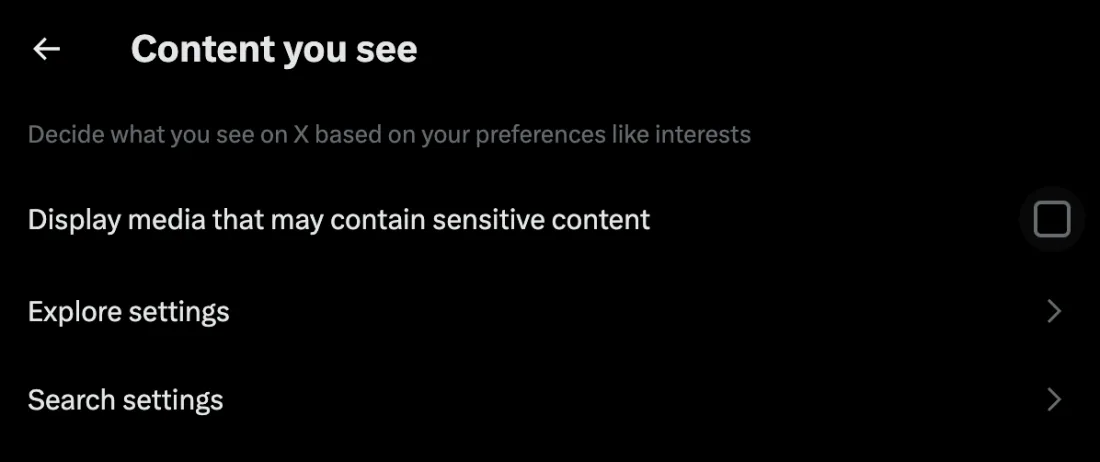
X on the web: Settings and privacy › Privacy and safety › Content you see. Captured 2026-08-18. Leave the box next to Display media that may contain sensitive content unchecked.
X says settings are saved automatically. Checking the box shows the media without a warning.
X app on Android
Tap the navigation menu icon or your profile icon, then tap Settings and privacy.
Tap Privacy and safety.
Under Safety, leave Display media that may contain sensitive content unchecked.
X app on iPhone
- The iOS app does not offer this checkbox. X's help page says to adjust your post media settings by logging in to X.com. Official X destination (opens in a new tab)
- Open x.com in Safari and sign in to the same account. Official X destination (opens in a new tab)
Go to Settings and privacy, Privacy and safety, Content you see, and leave the sensitive-media box unchecked.
What it covers
- Photos and videos the poster marked as sensitive
- Media X labeled sensitive after a report and review
- Posts you see while signed in to that account
What it does not cover
- Suggestive posts nobody labeled pass straight through
- Text posts and links to outside sites
- Anything you view logged out or from another account
- Reporting a post does not add a label; X says flagged media does not automatically get a warning, and it may decide the post does not meet its threshold
Search settings: Hide sensitive content
Two checkboxes in Search settings on x.com: Hide sensitive content and Remove blocked and muted accounts. They filter search results only. X says the choice applies to searches on the web and in the iOS and Android apps.
Depends on the poster or the platform marking the media as sensitive. Unlabeled suggestive content passes.
X on the web (x.com)
Search for anything, then click the more icon on the right of the search results page.
- Click Search settings. Official X destination (opens in a new tab)

X on the web: Search settings, both boxes checked. Captured 2026-08-18. Keep Hide sensitive content and Remove blocked and muted accounts checked.
Wait a few minutes.
X notes the setting may take several minutes to go into effect.
X app on iPhone and Android
- The apps do not show Search settings. X's help page says to log in to your account on x.com and use the web steps. Official X destination (opens in a new tab)
On x.com, run a search, click the more icon, then Search settings, and keep both boxes checked.
Your choice applies to searches on the web, in the iOS app and in X for Android, per X.
What it covers
- Search results on x.com and in the apps
- Posts from accounts you have blocked or muted, in search results
What it does not cover
- Search only; Home, For You, profiles and replies are untouched
- Sensitive here means labeled; unlabeled posts still appear
- Takes several minutes to apply, per X
Mute, block and muted words
Removes posts from accounts you block or mute, and posts containing words, phrases or hashtags you list, from your Home timeline and notifications. Only what you name is caught.
Works only for what you name. Nothing new is caught until you name it too.
Muted words on x.com
- Click More, then Settings and privacy. Official X destination (opens in a new tab)
Click the Privacy and safety tab, then Mute and block.
- Click Muted words, then the plus icon. Official X destination (opens in a new tab)
Enter one word, phrase or hashtag. Select Home timeline and Notifications, then From anyone.
Muting is case-insensitive, and muting a word also mutes its hashtag.
Under Mute timing choose Forever, then click Save.
Block or mute an account (web and apps)
Open the more icon at the top of a post from the account, or on their profile page.
Select Block, then Block again to confirm.
Blocked accounts cannot follow you or message you, and their posts leave your timeline. Blocking also unfollows.
Choose Mute instead if you want their posts gone without them knowing.
Review your lists under Settings and privacy, Privacy and safety, Mute and block on x.com, or under Safety in the apps.
What it covers
- Posts and notifications from accounts you block or mute
- Home timeline posts and notifications containing muted words, phrases or hashtags
What it does not cover
- Only accounts and words you name; new accounts and new wording pass
- Muted words apply to Home timeline and notifications only. X says you still see those posts via search
- Posts from people you follow that mention a blocked account can still appear
- Muted words do not stop push notifications you opted into for a specific account, per X
X questions
Does X's sensitive content setting block porn?
Not on its own. It hides media the poster labeled sensitive, or that X labeled after review. X's adult content policy asks posters to mark their media, and says it will adjust settings for accounts that keep failing to mark. Unmarked posts still show.
Can I change this inside the X app on iPhone?
X's help page says to adjust your post media settings by logging in to X.com. The Android app has the checkbox under Settings and privacy, Privacy and safety, Safety.
Can anyone stop me switching it back on?
No. X has no passcode or supervisor for this setting. If you want it enforced, do it outside X: Screen Time limits on Apple devices, or a network or DNS filter.
Does reporting a post hide it for me?
Not automatically. X says flagged media does not automatically receive a warning or get removed. If X decides it does not meet the threshold, it stays visible.
What On Guard adds
On Guard adds the layer X does not have: it detects explicit content on the screen itself, on Mac, Windows, and Android, in any app, checks each frame on the device and puts up a gate. When a known adult site is opened, your ally gets a check-in with the app, the device and the time, never the site.
The controls above are worth setting either way. On Guard is the layer for the moment a setting is not enough. How it works, explained.
Same platform, different job: Retrain the X For You feed.